As the year comes to a close, it’s important to take time to review key financial, tax, and system tasks in Acumatica. Year-end preparation helps ensure accurate reporting, reduces risk, and sets your team up for a smooth transition into the new fiscal year.
To make the process easier, we’ve outlined a practical Acumatica Year-End Checklist based on the most common tasks organizations complete before January 1.
Generate and Activate New Financial Periods
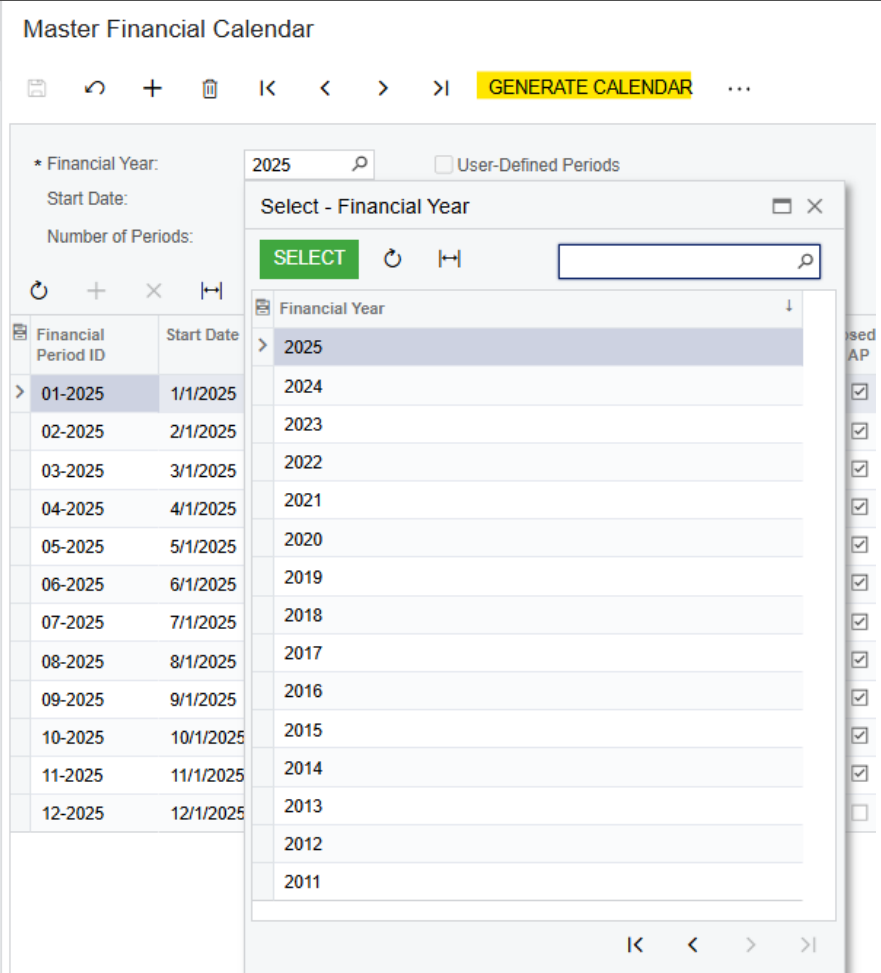
- Navigate to Master Financial Calendar screen (GL201000).
- Verify if the new year is already available in Financial Year dropdown. If not, click Generate
Calendar. In popup box, select which year you need to generate and click OK. Periods for the year will be generated and will be inactive on default.
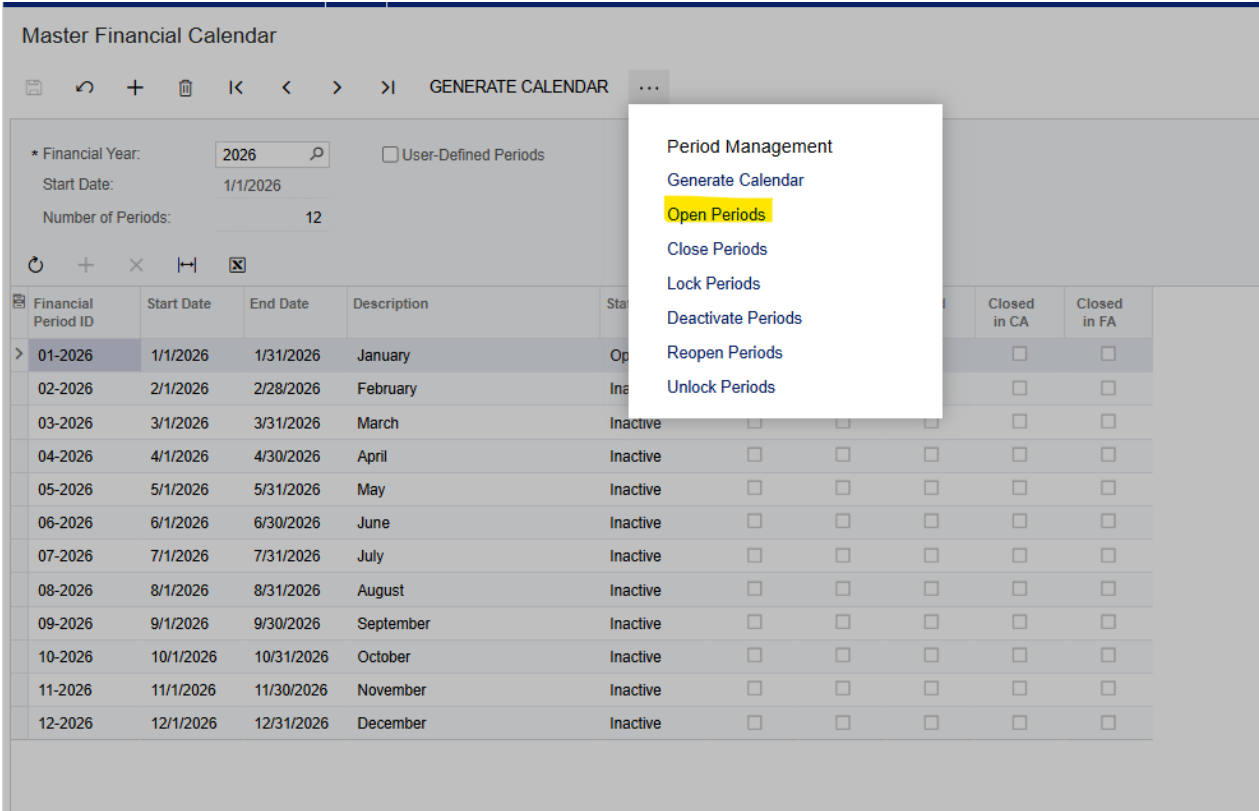
- To activate periods, click three dots > Open Periods.

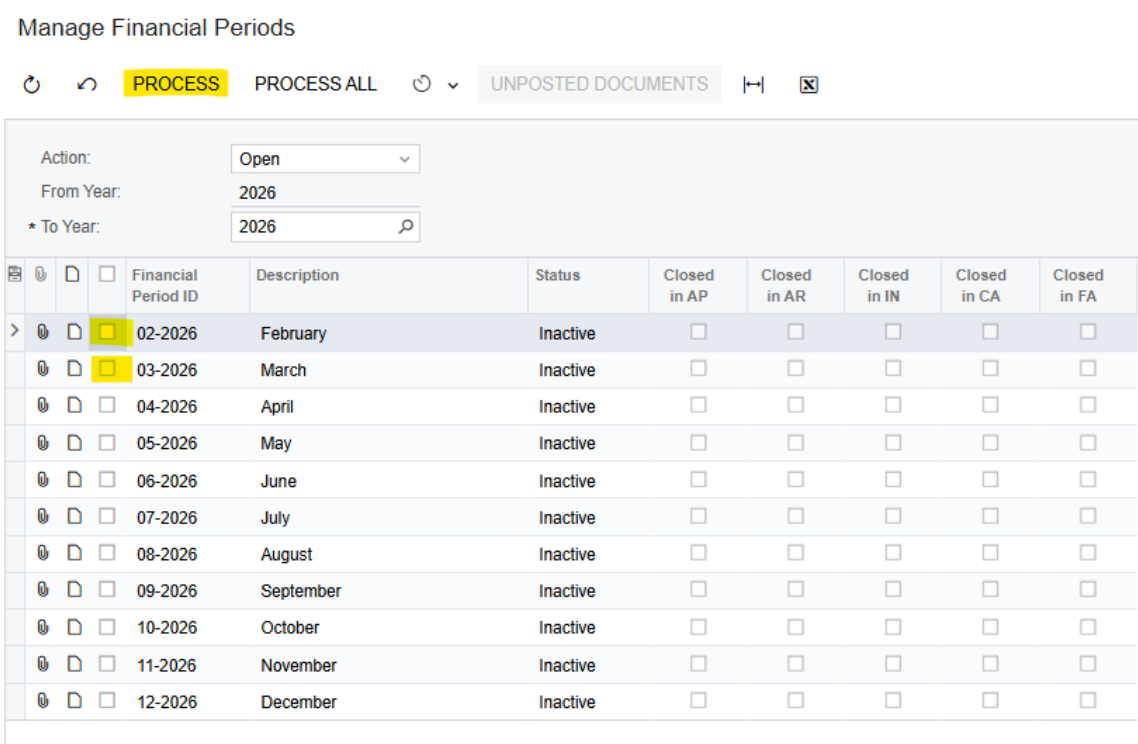
- On the Manage Financial Periods screen (GL503000), select specific period(s) or all periods for year to open and click Process.

Account Reconciliations with Subledgers
Make sure that all of your General Ledger accounts are reconciled to the subledgers (i.e. A/R, A/P, Inventory, Clearing Accounts and Bank Reconciliations)
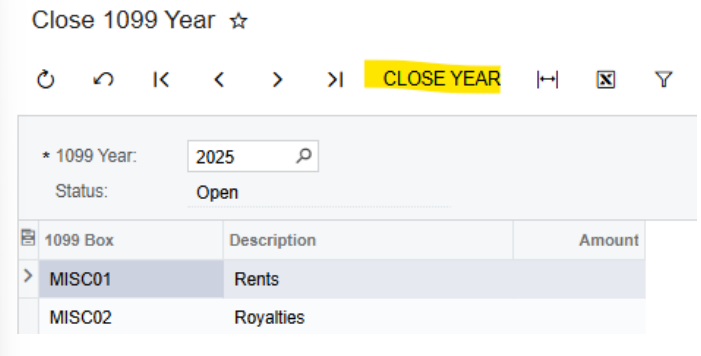
U.S. Form 1099 Reconciliations, Reports and Close 1099 Year
This article provides information about the Acumatica implementation of 1099-MISC and 1099-NEC tax documents and e-filing options for 2025.
Information for Customers who use Pre-Printed Forms
For the 1099-NEC Form (AP653100), you may need to adjust the printing settings. The general recommendation is to use Custom Margins and set the Left margin to 0.5.
Information for Customers who submit E-File
Changes to the IRS e-file formats have been implemented in the Acumatica builds listed below. Before e-filing, ensure you are on a proper build. Changes for the e-file format created on the
Create E-File (AP507500) form for both 1099-MISC and 1099-NEC are included in the following builds:
- 2025 R2 GA (Build 25.200.0248.2)
- 2025 R1 Service Pack 1 (Build 25.101.0153.5) and later
- 2025 R1 GA (Build 25.100.0054.7) and later
- 2024 R2 Update 18 (Build 24.218.0005) and later
In all currently supported Acumatica ERP versions, the electronic file format generated in the system is .txt. After the system generates the file, it should be uploaded to the IRS website by using the Filing Information Returns Electronically (FIRE) system. The generation of the .csv file for the Information Returns Intake System (IRIS) is not supported.
If you think you might need to update your build to correct alignment issues log a ticket with acumatica.help@i-techsupport.com. Once ready to process, verify your 1099 vendor calculations, create the required reports, and close the 1099 year once completed.
System Email/Exchange Email oAuth Application Expirations
The end of the year is a good time for your IT team to verify upcoming application expiration dates in the coming year. If there is an expiration date approaching, it’s better to get ahead of it by generating a new client secret and updating the secret value in Acumatica to avoid disruption in email service. Application secret expirations can be verified by logging into your Microsoft Azure/Identity admin site.
System Configuration Changes
If you are considering making any system configuration changes (i.e. – GL Account Classes, Customer Classes, Vendor Classes, Item Classes, etc.), it may be a good time to do this at the beginning of the New Year.
Sales Tax Changes
Verify if there are any sales tax changes that will be going into effect on January 1st in the areas where you are doing business.
Customer and Vendor Price Changes
Vendor or Customer price changes often occur on the 1st day of the New Year. You may want to consider updating these prices in your system to ensure accuracy of your purchase orders and sales orders.
Financial Reporting Changes
Some Financial reports may have been built using specific reporting periods. If so, they may need to be modified for the new fiscal year.
Retained Earnings Roll Over
Occasionally, we’ve found the retained earnings do not roll properly due backdated transactions, if this is the case you can correct it by running the recalculate account balances process.
Review 2025 Payroll Updates
As part of year-end preparation, it’s also important to review payroll-related updates for the new year. Payroll tax limits, filing requirements, and reporting rules can change annually, and understanding what’s new for 2025 can help you avoid compliance issues and rework.
For a detailed breakdown of U.S. payroll considerations, including common year-end questions and 2025 updates, refer to Acumatica’s 2025 Year-End Payroll Guide.
Questions about Year-End Tasks you need to complete in Acumatica?
If you work with i-Tech as your Acumatica partner, log a support ticket if you have any questions about preparing for the new year. If you’re not currently on Acumatica and want to learn more about how cloud ERP can help you manage your business, reach out here.