Acumatica AI for Your Cloud ERP
Unlock the Power of AI in Acumatica ERP.
What AI in Acumatica Does Today
Acumatica has been adding AI to the platform since 2024: document recognition that reads supplier invoices, bank feed matching that learns a company’s patterns, anomaly detection that flags duplicate invoices and unusual vendor payments, and AI Studio, which builds automated workflows from a plain-language description. Which of these a company can use depends on its product line and version. i-Tech configures them as part of an Acumatica implementation or a support plan, and checks first whether each one solves a problem the business actually has.
Which AI Features Are in Your Acumatica
Acumatica split its product lines in April 2024. Customers from before then are on the legacy line (Small Business, Advanced, EnterpriseX); customers since are on the new line (Essentials, Select, Prime, Enterprise). The newer AI features only run on the new line.
| Product line and version | AI features included |
|---|---|
| Legacy line, any version | AP Document Recognition (OCR invoice capture), Bank Feed Reconciliation with learned matching |
| New line, 2025 R1 | Everything above, plus the infrastructure for the features below |
| New line, 2025 R2 and later | AI Studio, anomaly detection, AI Advisors, Advanced Order Management |
| New line, 2026 R1 and later | AI agents for customer service and self-service portal options; the AI Assistant for plain-language questions, rolling out through Acumatica’s managed availability program ahead of 2026 R2 |
Some features require the Modern UI, which means converting customizations first.
AI Innovations that Elevate Performance
AI Intelligent Advisor
Anomaly detection reviews transactions as they post and flags the exceptions: a duplicate invoice, a changed vendor bank account, a cost that is out of pattern for a project. AI Advisors surface patterns in the data that need attention, and from 2026 R1 anomaly detection can run against any Generic Inquiry, not only a fixed set of reports.
AI-Driven Automation
AI Studio builds automated workflows from a description in plain language: draft the follow-up email when an order ships late, write product descriptions from item attributes, route an exception to the right approver. It runs inside Acumatica, with no code, and connects to external AI services where a workflow needs one. It takes setup: the prompts and workflows have to be designed for the business, which is work i-Tech does with the client.
AI Smart Assistants: Enhancing Business Efficiency with AI
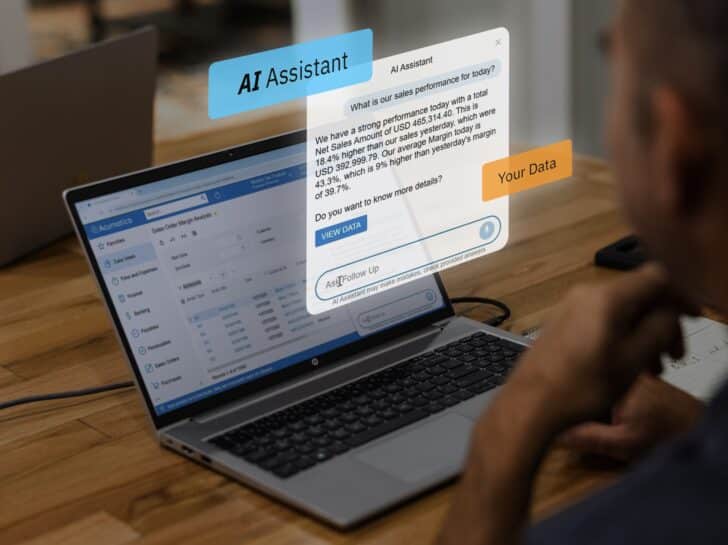
The AI Assistant answers questions about the business in plain language, with charts where they help, so a manager can ask for this month’s open orders by warehouse without building a report. It handles simple questions well today; complex questions across modules are still in development.
Getting Access
- On the legacy line: moving to the new line is a contract change, not a data migration or a forced upgrade. Discounts carry over; terms update to Acumatica’s current policies.
- On the new line, older version: upgrading to 2025 R2 or later turns the features on.
- On the new line, 2025 R2 or later: the features are available now, and the question is which ones are worth configuring.
i-Tech’s client success team can pull the contract and say which line, which version and which features apply.
Frequently Asked Questions
Which Acumatica version has AI?
AP document recognition and bank feed matching are in every version. AI Studio, anomaly detection and AI Advisors need the new product line on 2025 R2 or later. The AI Assistant arrives with 2026 R2, with early access through Acumatica’s managed availability program.
Do we have to switch product lines to get AI?
For the newer features, yes. The switch is new licensing paperwork with Acumatica, with no data migration and no forced version upgrade.
Does AI Studio need a developer?
No. Workflows are described in plain language inside Acumatica. Designing good ones takes time and knowledge of the business process, which is where i-Tech helps.
Is our data used to train AI models?
Acumatica’s position is that customers keep control and ownership of their data. i-Tech reviews the data handling terms of any AI feature with the client before it is turned on.
Industries and Businesses We’ve Helped Transform

Fencing & Perimeter Security
Heavy Equipment, HVAC and Mechanical equipment

Business Services, event planning, staffing and professional services

Steel Pipe Suppliers
Our Customer Success Stories
Q-PAC Fan Systems Unlocks Growth with Acumatica Manufacturing Edition
Boca Terry gets full visibility into their operations with Acumatica Retail Edition
Eagle Fence’s exponential growth with Acumatica Distribution Edition
OFSi International optimizes their Pipe Supply Operations with Acumatica Pipe Edition
Acumatica ERP Partner Awards





Related Insights

Acumatica AI: What's Available Today, by Product Line
Which AI features you get in Acumatica depends on your product line and version. What is available now and what it means for planning.

What We're Most Excited About in Acumatica 2026 R1
What i-Tech’s team likes most in Acumatica 2026 R1: the AI Assistant, a shop floor screen, CRM updates, AR and AP automation, and progress billing.
Acumatica Classic UI Is Going Away: What Conversion Involves
Acumatica’s Classic UI is being retired. The two deadlines that matter, what converting to the Modern UI involves, and where to start.
Experience the Future of ERP
Discover how Acumatica’s AI-powered cloud ERP can streamline operations and propel your business forward.