Workflow Automation Services
Your team reviews the work instead of retyping it.
Workflow automation from i-Tech answers your questions in minutes, drafts transactions, and takes over the reporting your team maintains by hand.
What is workflow automation?
Workflow automation is software that handles the repeatable steps of a business process, so people only deal with the exceptions. It can read an order, check it against your rules, and enter it.
Alloy, our workflow automation platform
Alloy by i-Tech is the intelligence layer that runs your automations. It can read your orders, items, and customers from your ERP and any other system with an open API. Then it does the routine work: enters orders, matches invoices, drafts reports. Ask it a question in plain English and it answers in minutes, pulling live data.
There is no data lake or warehouse to build. Alloy connects through your systems’ existing interfaces, so you get answers in days, not quarters.
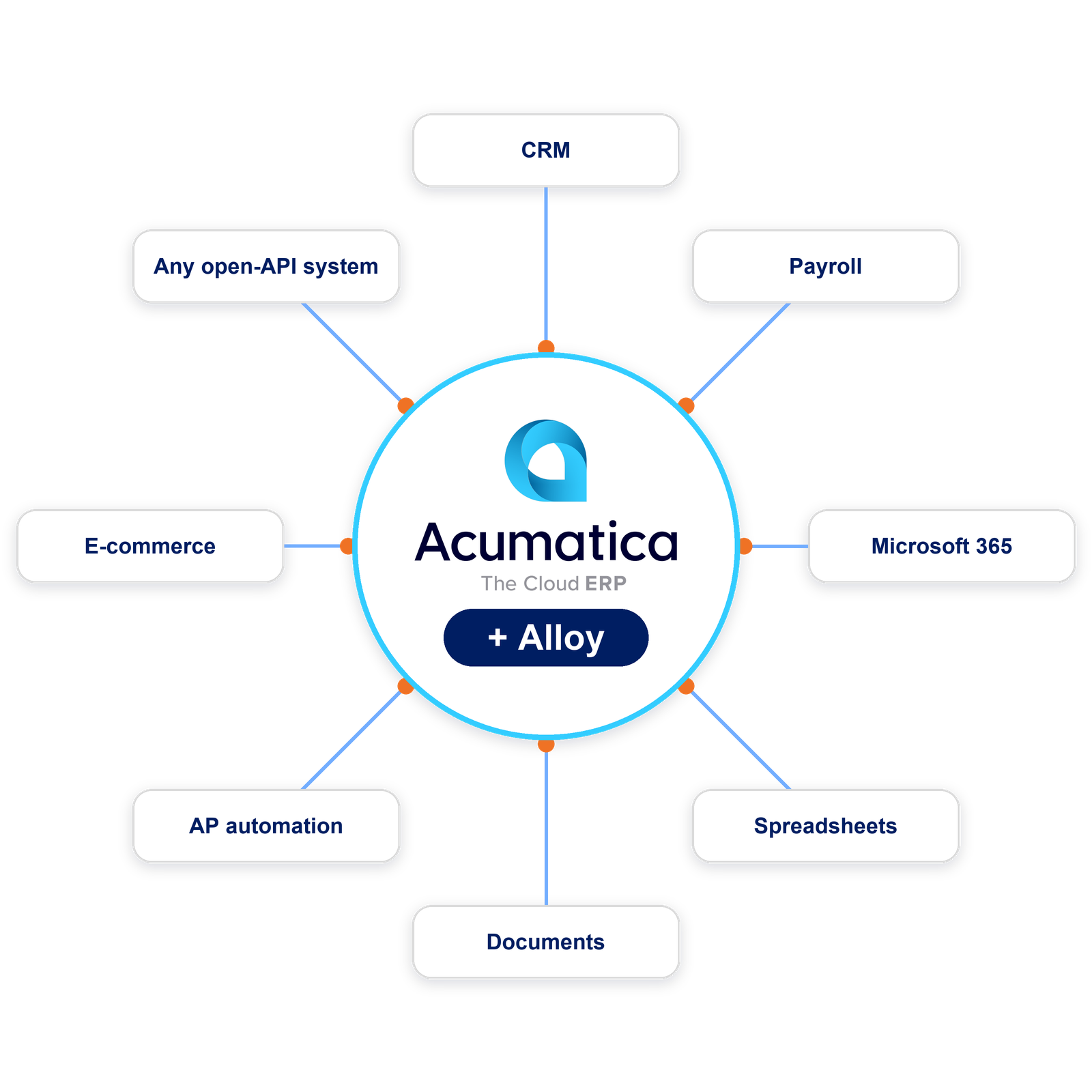
Built to work with your ERP
i-Tech is a Gold Certified Acumatica partner. Whether you run Acumatica or another ERP, Alloy makes the system you already run measurably smarter, with nothing new to host.
- Reads your system live: Ask a question in plain English and get the answer in minutes, with no report request waiting in a queue.
- Writes back to it: Alloy drafts sales orders and entries in your ERP for your team to review.
- Reaches past it: Your CRM, payroll, documents, and any system with an open API, so a question that spans them gets one answer.
- Works beside your ERP’s built-in AI: Supplier bill recognition and anomaly detection stay where they are, and we set them up first.
If you’re an i-Tech Acumatica client, we offer Alloy with your i-Tech Optimization Plan, under the SLAs you already have with us.
What Alloy gives your team

Decide on current numbers
One live view across your ERP and every connected system, on demand.

Lower cost to operate
Automation absorbs the manual reporting that consumes your team’s hours.

Delivered by i-Tech
We set it up, build your automations, and support it. What we build is yours.
Six jobs we take off your team's plate
Each one runs on your items, your customers, and your rules. If you don’t see your use case, tell us what goes in, what should come out, and where the work lives today. We can scope it.

Orders drafted for you
Alloy can read orders from email, PDF, and portals, then drafts the sales order for your team to check.

Supplier invoices without the busywork
Each bill is matched to its purchase order and receipt. Clean ones post, and exceptions arrive with the reason.
Problems you see early
See which late POs are holding up the most work, and catch job cost overruns while there’s still time to act.
Cash applied the day it lands
Remittance emails matched to open invoices automatically, even when the customer short-pays.

Answers without the hunt
Ask in plain English and get the answer from your ERP and the systems around it.

Customers slipping away
Accounts with falling orders or margin get flagged, with a draft of the outreach.
Which job should you automate first?
Pick the line that sounds like your week. Each one shows an ordinary day with Alloy.
We retype orders from email and PDFs
A purchase order lands as a PDF at 9:12. By the time your order desk looks, Alloy has matched part numbers, checked price and ship-to, and drafted the order. Mismatches come back with a note saying why.
Where we start: Alloy drafts every order and your order desk releases it.
What we measure first: the hours your team spends keying orders today.
Supplier invoices pile up on our desk
A supplier bill arrives and Acumatica reads it. Alloy matches it to the purchase order and receipt and posts the clean ones. The rest reach accounts payable with the reason attached.
Where we start: Alloy proposes each match and accounts payable posts it. Clean invoices can move up to approved once the matches prove out.
What we measure first: the days from invoice received to invoice posted.
We build the weekly report by hand
Thursday night’s export-and-fix becomes a draft waiting Monday morning, built to your team’s definitions. Your controller reviews it, adjusts it, and sends it.
Where we start: Alloy drafts the report and your controller owns the send.
What we measure first: the hours the report takes today, and how often two versions of the number show up.
Start with the process your team complains about most. In 30 minutes, we tell you whether it can be automated and what a smart first step looks like.
You choose how much runs on its own
Nobody hands over the keys on day one. Every workflow starts supervised and moves up only when you trust it. We help you build the first couple workflows and train your team on how to build future ones.

Suggested
Alloy drafts the work and a person does it. With supplier invoices, accounts payable posts every match.


Approved
Alloy does the work and a person signs off before it commits. Clean invoices wait for one-click sign-off.

Automated
It runs start to finish and shows you only the exceptions. Clean invoices post themselves.
At every level, each request is tied to a named person and written to an audit log you can export.
When Alloy is unsure, it asks someone on your team, and the answer becomes the standard. Start where your data is already clean and earn your way up.
Questions before you automate anything
How can we automate manual workflows in our operations?
Start with the one process your team complains about most. In 30 minutes we tell you whether it can be automated, and we measure what it costs today so the improvement is your number.
How do you keep automation from touching money or customers without approval?
It does not act on money or customers until a person says so. Every workflow starts as a draft that someone on your team reviews, and you decide when a step runs on its own. Every action is logged, so you can see who approved what.
Do we need Acumatica or a specific ERP to start?
No. We work with whatever you run today, and Alloy connects to any system with an open API. Acumatica clients do start ahead, because their data is already structured, and they can add Alloy to their Optimization Plan. But no matter what systems you’re on, the AI Readiness Conversation tells you honestly what has to change first.
Is it a problem if our data is a mess?
A messy start is normal. Cleaning up duplicate customers, vendors, and items is often the first project, and it makes every later workflow more reliable.
How do we know the results are right?
Alloy only answers from definitions you have approved, using your real data. When it is not sure, it asks someone on your team, and their answer becomes the rule for next time.
Will this replace people on our team?
In a business of 20 to 500 people, it replaces the retyping and chasing, not the people doing it. Most clients put that time back into sales, service, or the backlog. If reducing headcount is your goal, tell us up front, because it changes which processes we pick.
Who owns what's built?
You do: your data, the workflows we build, and the logic behind them.
What happens when a connected system changes?
We keep it working. When another system changes how it connects, we test your workflows and fix what breaks. That is part of the service.
How is this different from connecting ChatGPT or Claude to our ERP?
A general chatbot answers from whatever it can reach, so you end up double-checking every answer. Alloy runs inside the permissions you set, and once a workflow is approved it runs the same way every time.
How much does it cost?
The AI Readiness Conversation is free. We do not quote a build until we have looked at your systems and picked the first workflows, because until then we would be guessing. Every build includes setup and training so your team can run it.

“One of the best readiness assessment conversations I’ve had, not just on AI, but on many different things that I’ve been through”
Chip Hooks
Managing Director. Berthold Technologies USA, i-Tech Client Since 2015